Tray Mount
原理:定位板/PCB 用螺絲鎖在上殼的螺柱上,最便宜常見。
How: PCB or plate screwed onto posts in the case — cheapest, most common.
手感:硬,敲打聲集中在螺柱位置。
Feel: Stiff, sound concentrates at the screw points.
▸ 辦公室入門鍵盤 ▸ Entry-level office boards
今天,我想跟大家分享⋯⋯ Today, I'd like to talk about...
Requirements · System Design · Sprint Planning · Code Review · Retrospectives...
(點擊任意處繼續) (click anywhere to continue)
從種類到軸體、鍵帽、結構、PCB、磁軸——從零搞懂你打字時手指底下發生的事。
From types to switches, keycaps, mounting, PCB, and Hall effect — understand what's happening under your fingers.
從發聲與觸發原理把鍵盤分成四大類。知道自己的起點,才會知道為什麼要升級。 Four categories by actuation principle. Know where you start to know why you'd upgrade.
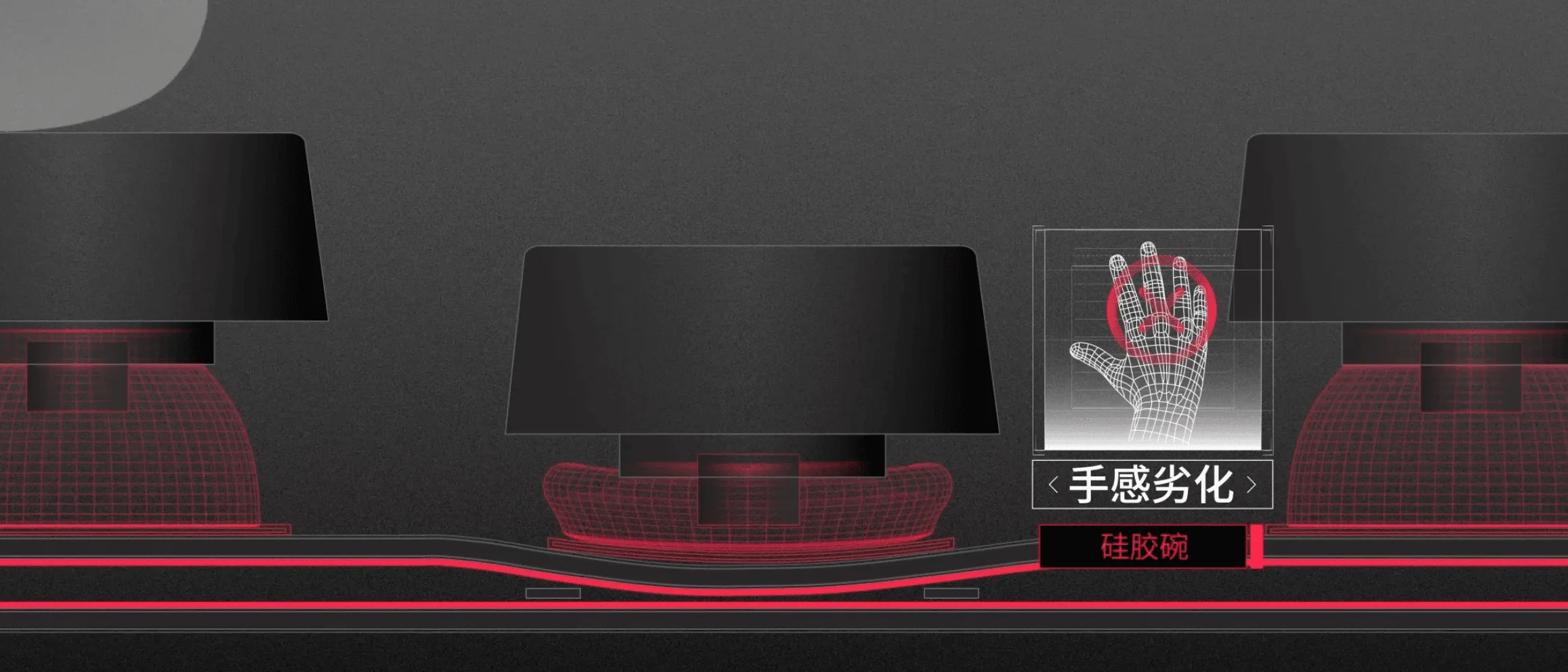
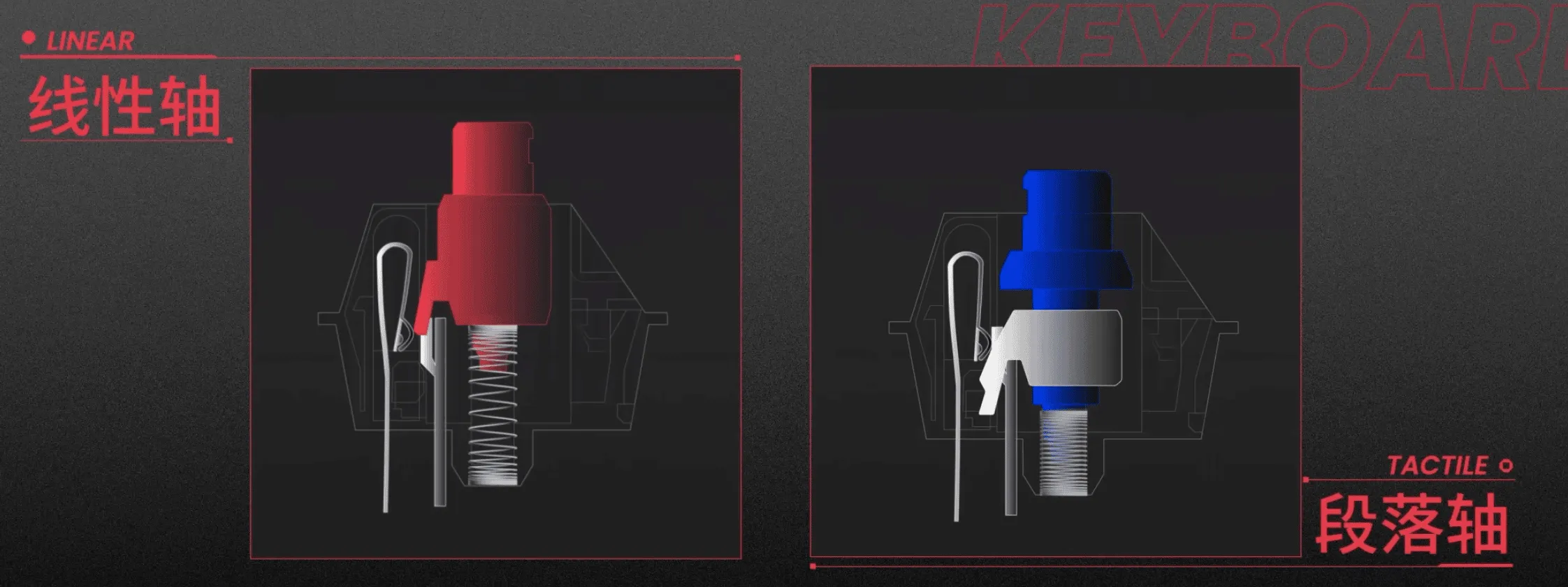
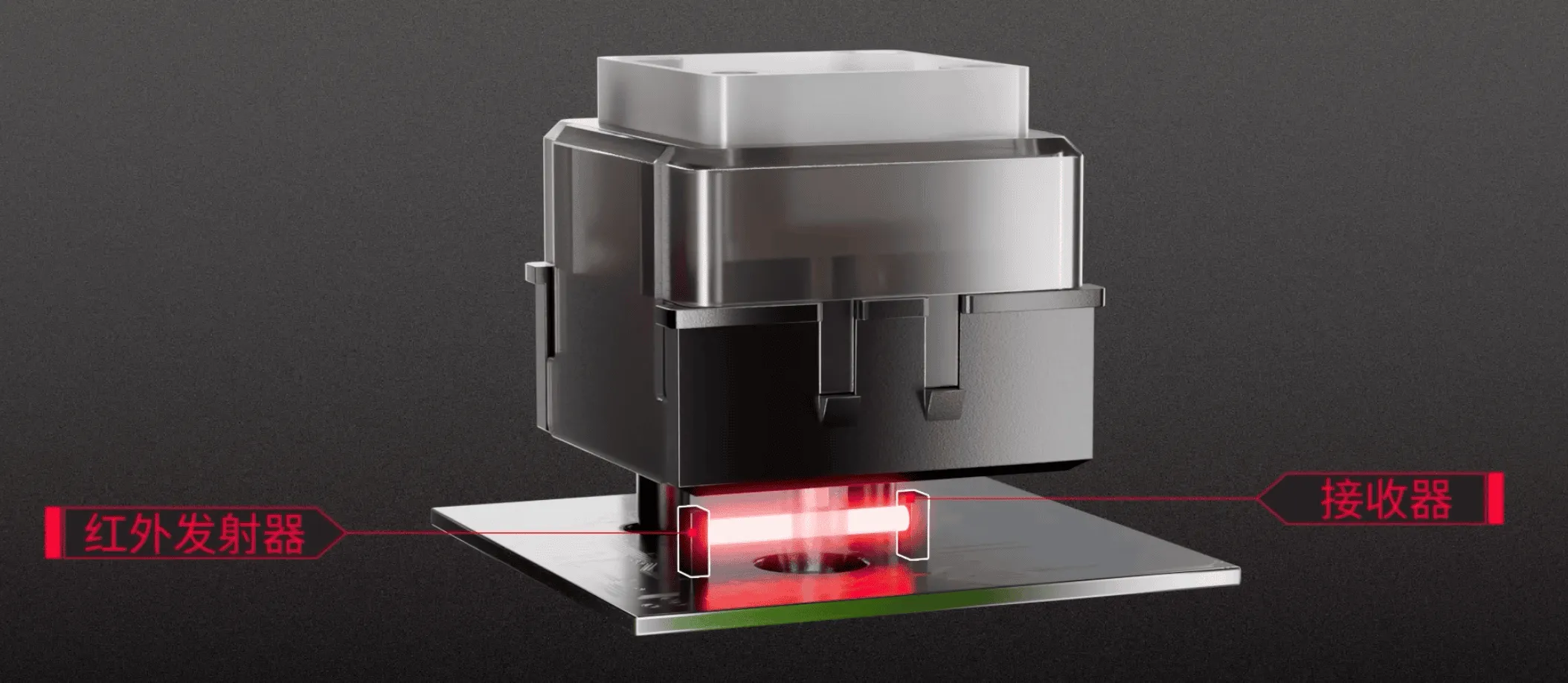
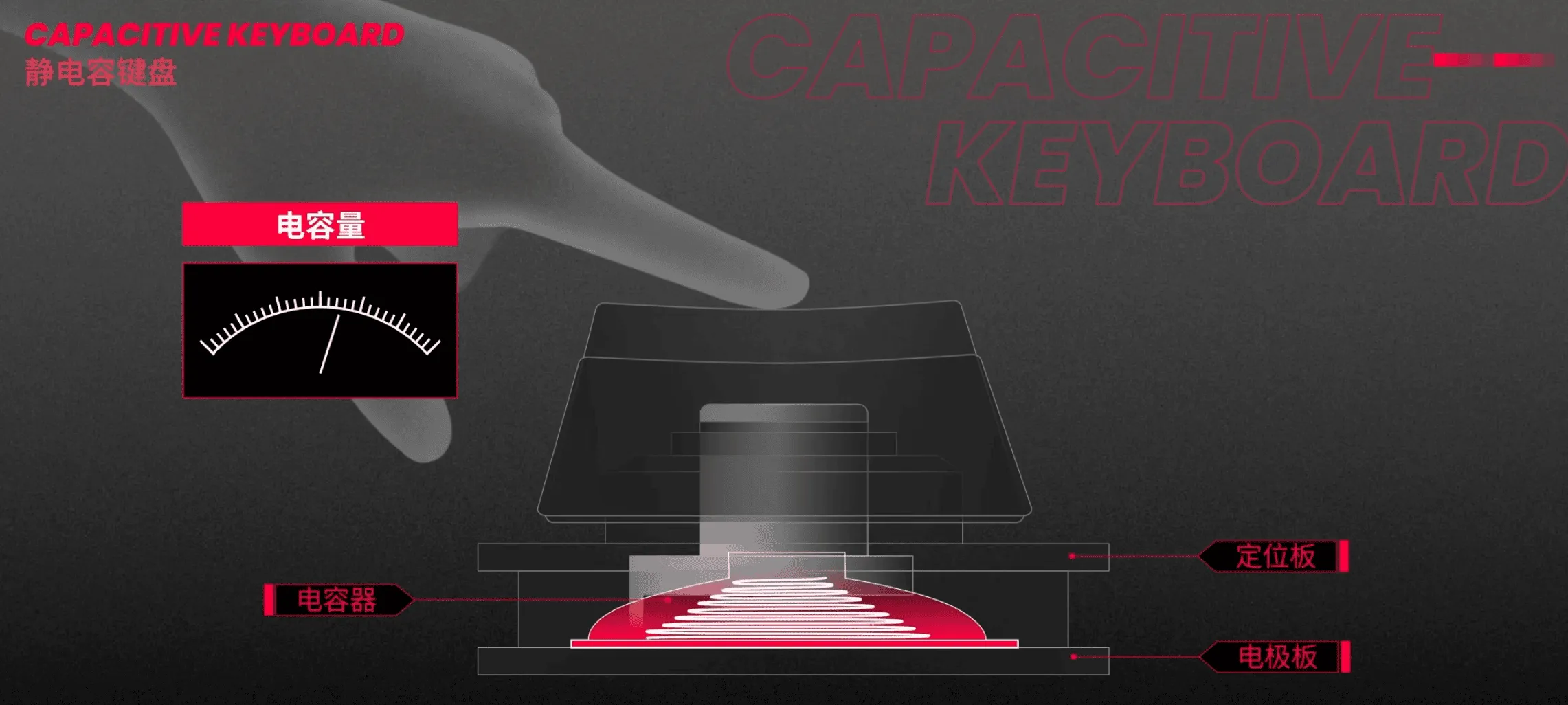
機械軸依手感分成三大家族:差別在「按下時有沒有段落感」和「會不會發出 click 聲」。
(光軸、磁軸等不同觸發原理請見「鍵盤種類」與「磁軸專章」。) Mechanical switches split into three families based on whether there's a tactile bump and whether it clicks. (Optical, Hall effect and friends are covered in Keyboard Types and the Magnetic chapter.)
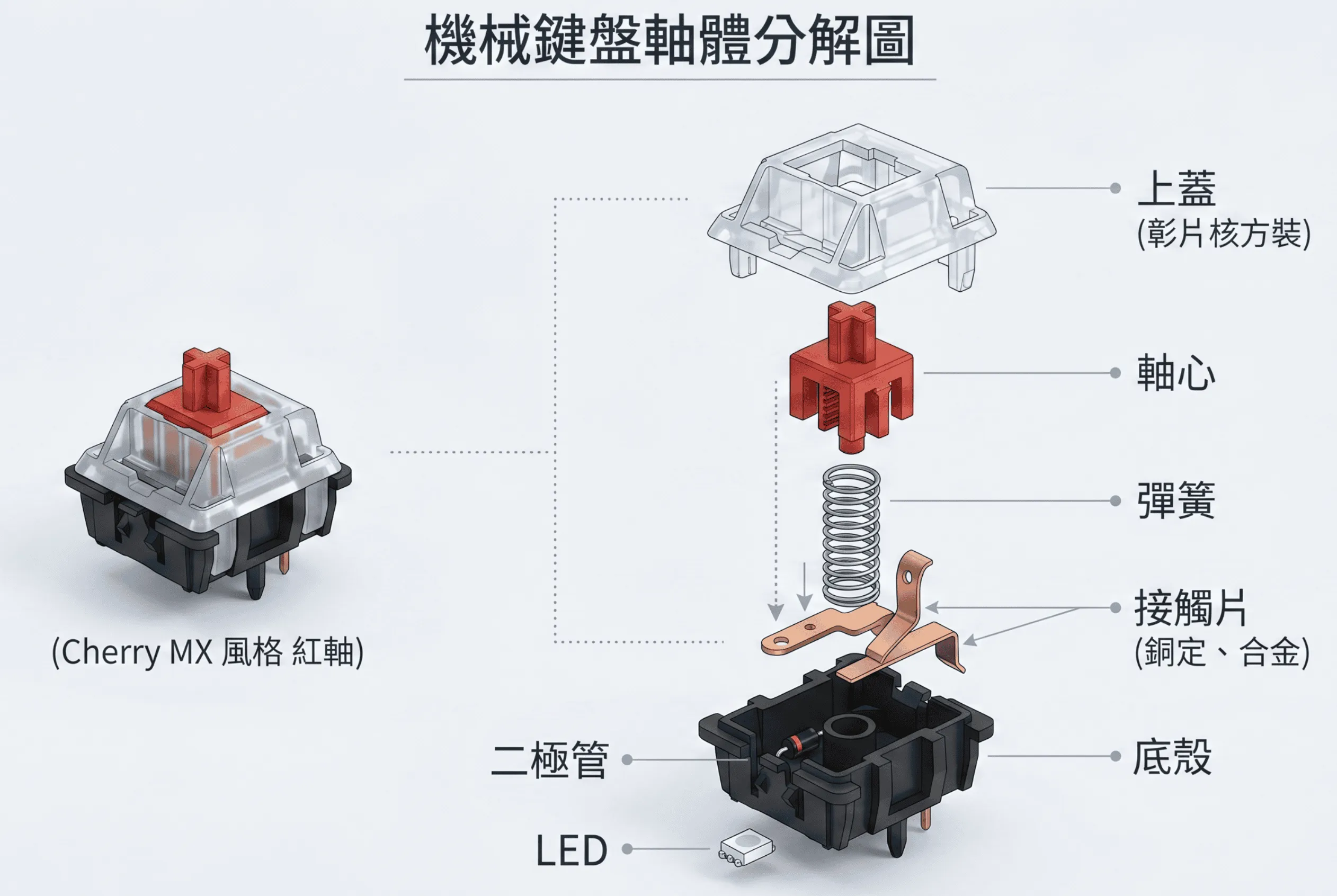
| 規格Spec | 意義What it means | 參考值Typical |
|---|---|---|
| 觸發克數Actuation Force | 啟動鍵需要的力,越輕越省力但越易誤觸 Force to trigger a key — lighter = effortless but easier misclicks | 35g – 67g |
| 總行程Total Travel | 鍵帽從頂端按到底的距離 Distance from top to bottom-out | 3.5mm – 4.0mm |
| 觸發行程Actuation Point | 按到多深會送出訊號,越短反應越快 Depth where the signal fires — shorter = faster response | 1.2mm – 2.0mm |
| POM / PA / UHMWPE | 軸體外殼/柱心材質,影響聲音與順滑度 Housing/stem materials — affect sound and smoothness | — |
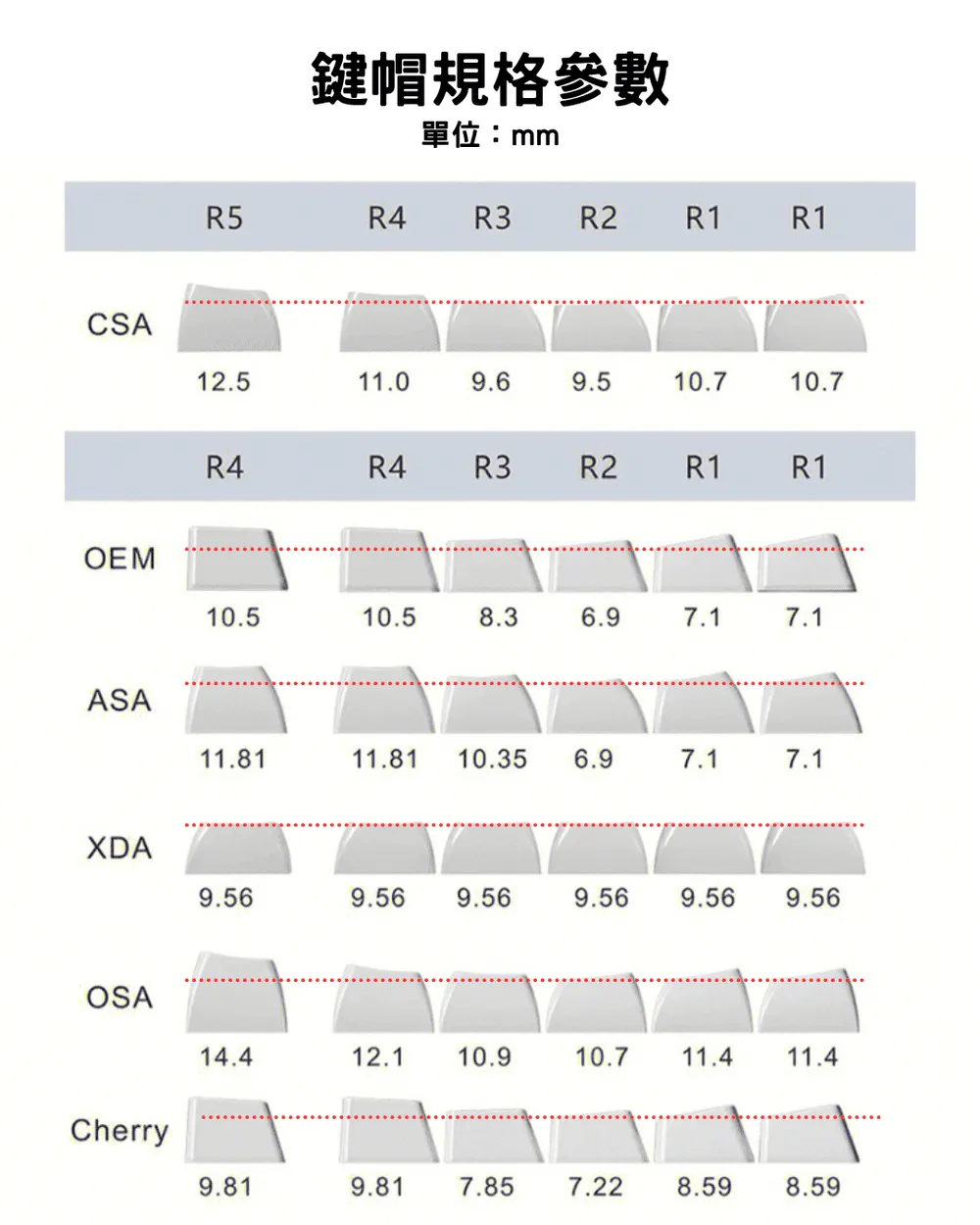
材質決定觸感與耐用度;高度決定打字姿勢;印刷方式決定字會不會掉。 Material decides feel and durability; profile decides typing posture; printing decides whether the legends survive.
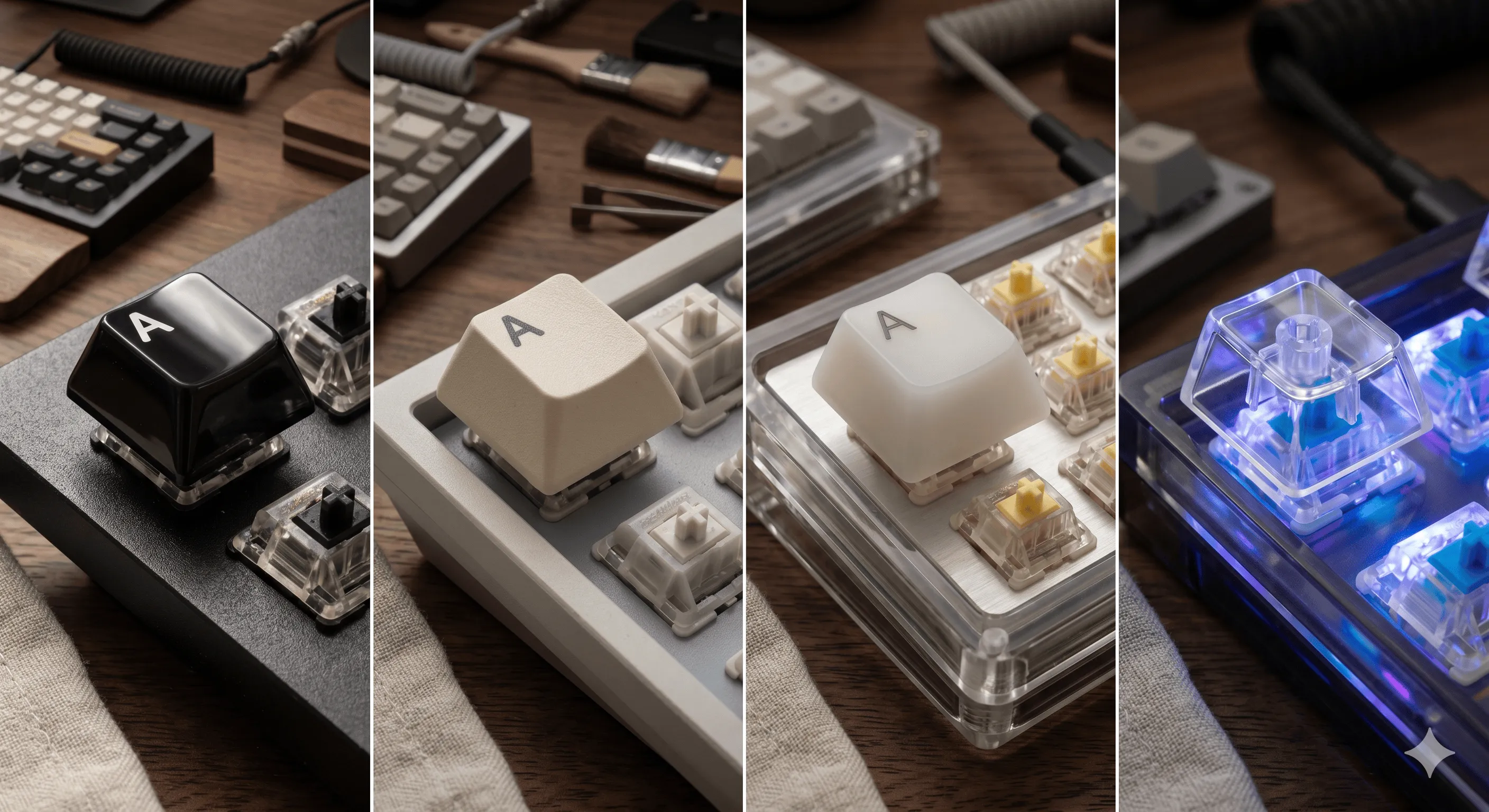
| Profile | 特色Characteristics |
|---|---|
| OEM | 原廠常見、中等高度Stock standard, medium height |
| Cherry | 比 OEM 矮一點,最受歡迎Slightly shorter than OEM, most popular |
| SA | 高、球面凹陷、復古Tall, spherical, retro vibe |
| XDA / DSA | 矮、平面、各排同高Short, flat, uniform height |
| MOA / MT3 | 復古高度、深凹陷Tall vintage profile, deep dish |
雷射燒蝕表面,最便宜,字會慢慢淡掉
Cheapest, legends fade over time
染料滲入鍵帽,不會掉色,PBT 常見
Dye penetrates the cap, never fades, common on PBT
兩種塑料射出疊合,立體感強,耐用度頂級
Two-color molding, raised legends, top-tier durability
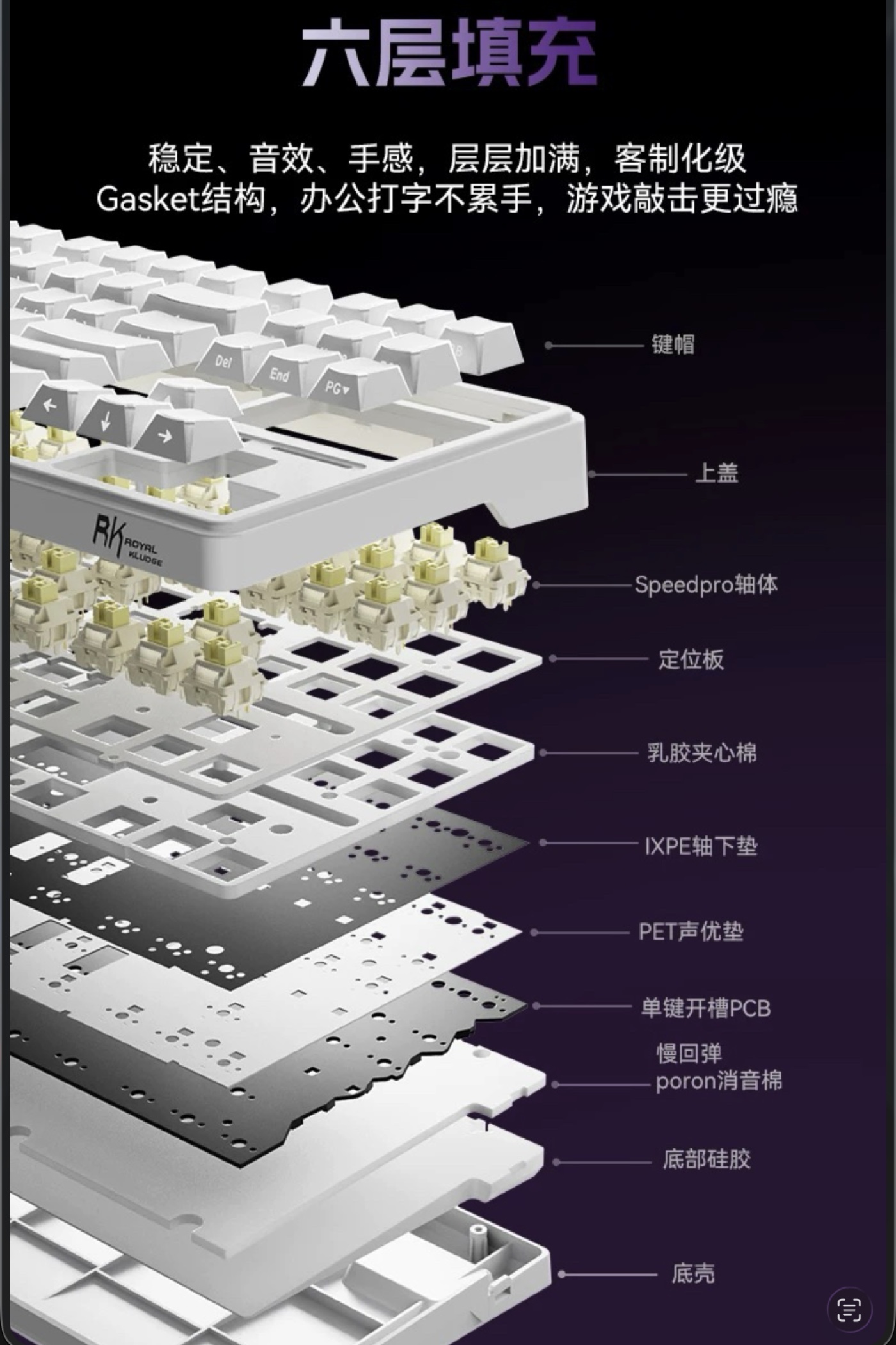
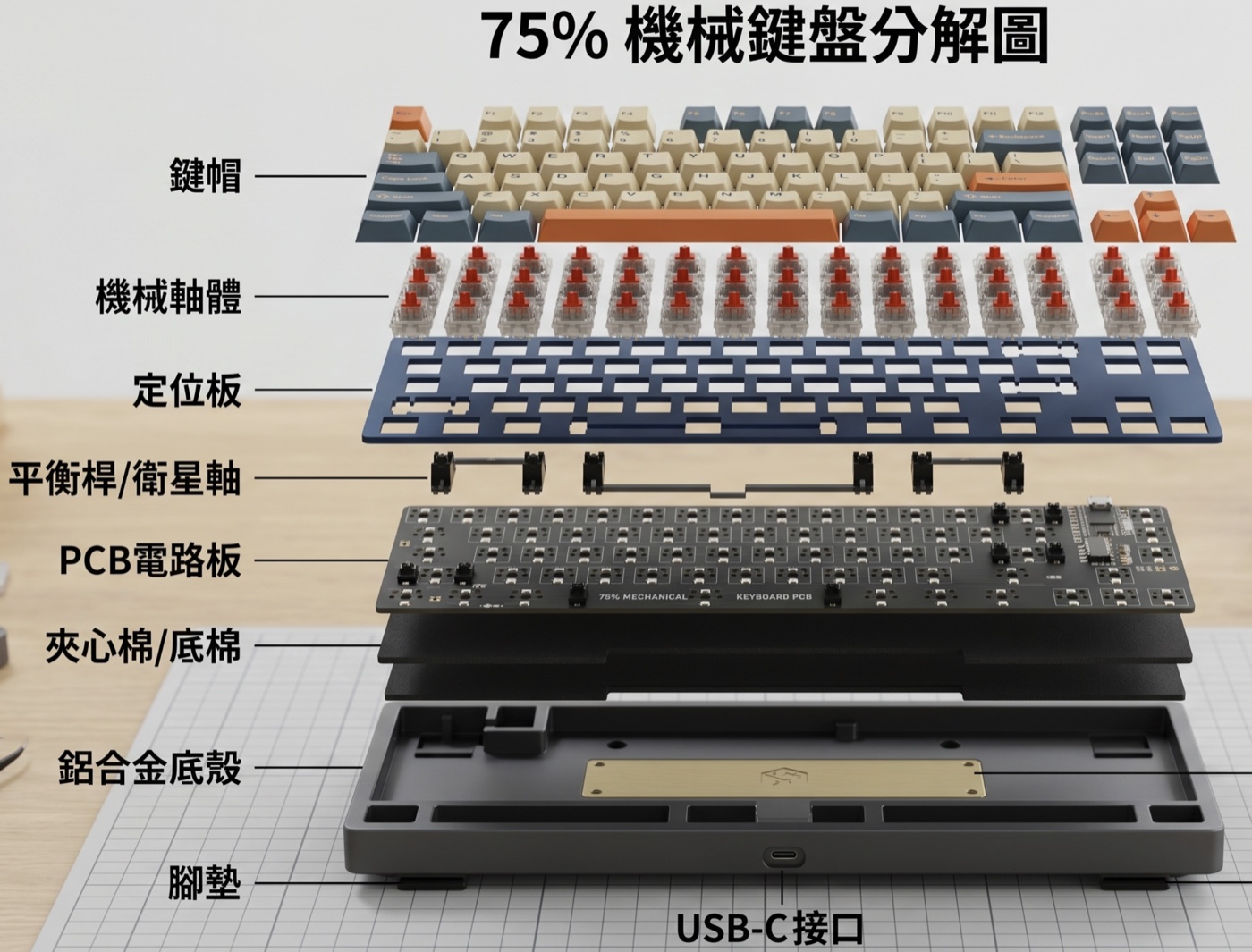
先看一張機械鍵盤的爆炸圖,了解內部各層怎麼疊起來;再看下方各種結構的差異——同樣的軸體,鎖在不同結構裡,聽起來、按起來會完全不同。 First, see how a mechanical keyboard stacks layer-by-layer; then explore how different mounting styles change the feel — the same switch sounds and feels completely different across mounts.
原理:定位板/PCB 用螺絲鎖在上殼的螺柱上,最便宜常見。
How: PCB or plate screwed onto posts in the case — cheapest, most common.
手感:硬,敲打聲集中在螺柱位置。
Feel: Stiff, sound concentrates at the screw points.
▸ 辦公室入門鍵盤 ▸ Entry-level office boards
原理:定位板鎖在上殼,整片板被夾住。
How: Plate screws into the top case — whole plate is clamped.
手感:扎實一致,回饋直接。
Feel: Firm and uniform, direct feedback.
▸ 客製化中價位主流 ▸ Mid-tier custom mainstream
原理:定位板/PCB 鎖在下殼,上殼僅作蓋子。
How: Plate or PCB screws into the bottom case, top case just covers.
手感:聲音偏空、回饋普通。
Feel: Hollower sound, average feedback.
▸ 中階量產鍵盤 ▸ Mid-tier mass-market boards
原理:定位板用矽膠/Poron 條夾在上下殼之間,不直接鎖死。
How: Plate sandwiched between gaskets (silicone/Poron), no rigid screws.
手感:有彈性、聲音柔和,目前最熱門結構。
Feel: Bouncy, softer sound — the current hotness.
▸ 客製鍵盤主流選擇 ▸ Most popular custom mount
原理:定位板邊緣有薄金屬片提供彈性,類似 gasket 但更輕量。
How: Thin metal leaves give flex, like gasket but lighter.
手感:彈性更線性、回彈快。
Feel: Linear flex, quick rebound.
▸ 高階客製如 Mode、Salvun ▸ High-end customs (Mode, Salvun)
原理:定位板邊緣靠 O 型橡膠圈固定。
How: Plate held by O-rings around the edge.
手感:彈性大、聲音深沉。
Feel: Lots of flex, deep sound.
▸ Norbauer / 部分客製 ▸ Norbauer / select customs
原理:完全沒有定位板,軸體直接焊在 PCB。
How: No plate at all — switches solder directly to PCB.
手感:最軟、最特殊的回饋。
Feel: Softest, most unique feel.
▸ 進階玩家自組 ▸ Advanced DIY builds
PCB 決定能換什麼軸、能不能改鍵位、能不能 N-Key Rollover。 The PCB decides which switches you can use, whether you can remap keys, and whether N-Key rollover works.
軸體插在金屬腳座上,徒手就能換軸,新手首選。
Switches slot into sockets — swap them by hand, no soldering. Beginner-friendly.
✔ 換軸方便 ✘ 腳座壽命有限 ✔ Easy swaps ✘ Sockets wear out
軸體直接焊死在 PCB,穩定耐用,但換軸需要拆焊。
Switches soldered directly — stable and durable, but desoldering is required to swap.
✔ 觸感穩定 ✘ 改裝門檻高 ✔ Stable feel ✘ Higher modding barrier
無線常見藍牙 / 2.4G dongle,電競推薦 2.4G 低延遲。
Wireless typically Bluetooth or 2.4 GHz dongle — gamers prefer 2.4 GHz for low latency.
✔ 桌面整潔 ✘ 需充電 ✔ Clean desk ✘ Needs charging
| 名稱Name | 特色What it does | 適合Best for |
|---|---|---|
| QMK | 開源、最強、要寫 C 編譯Open-source, most powerful, requires C compile | 玩家、客製鍵盤Enthusiasts, custom builds |
| VIA | 瀏覽器拖拉就能改鍵位,QMK 的 GUIDrag-and-drop in browser, GUI on top of QMK | 大部分使用者Most users |
| ZMK | 無線優化、低耗電Wireless-optimized, low power | 無線分離鍵盤Wireless / split boards |
| Vial | VIA 進階版,支援巨集、組合鍵Advanced VIA — macros, combos, tap-dance | 愛折騰的玩家Tinkerers |
點上方按鈕切換配列,看看哪些鍵會留下、哪些會被砍掉。 Click a layout to see which keys stay and which get cut.
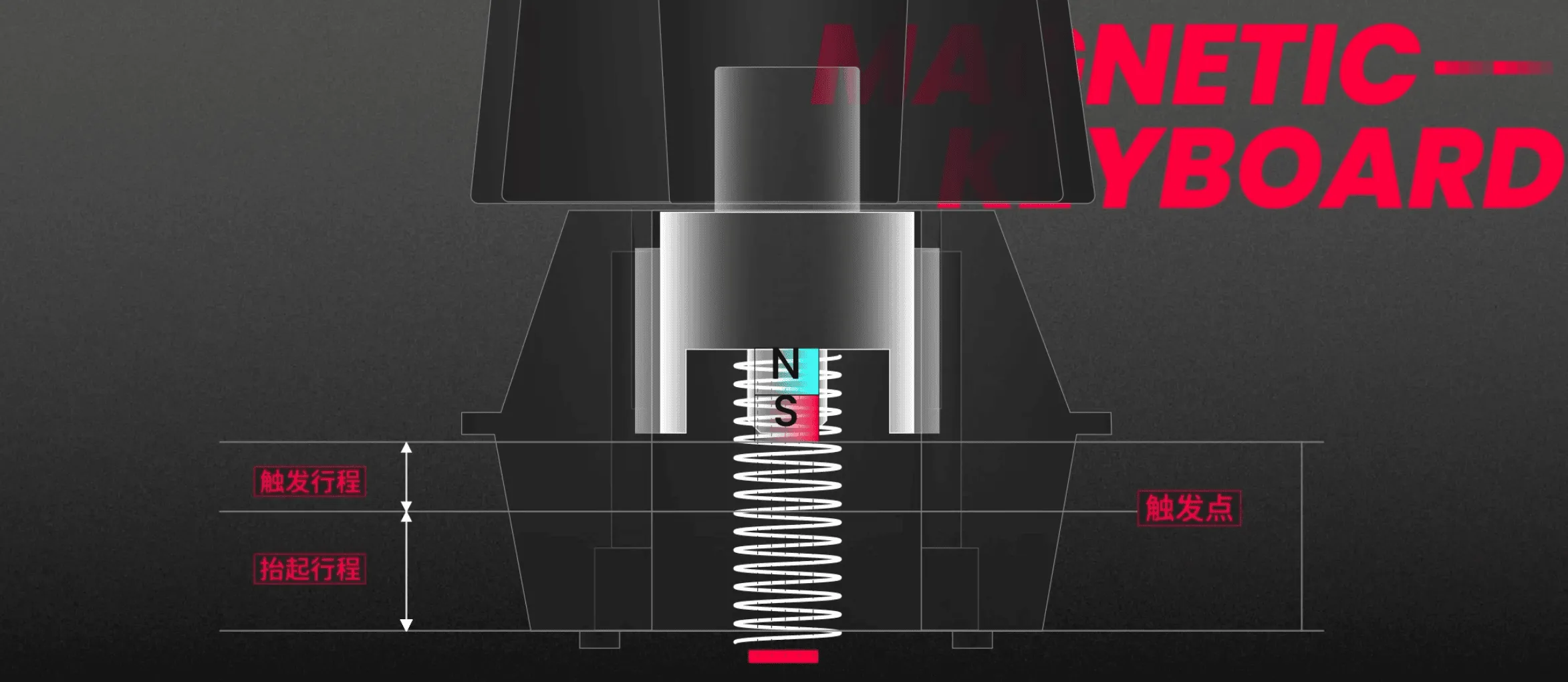
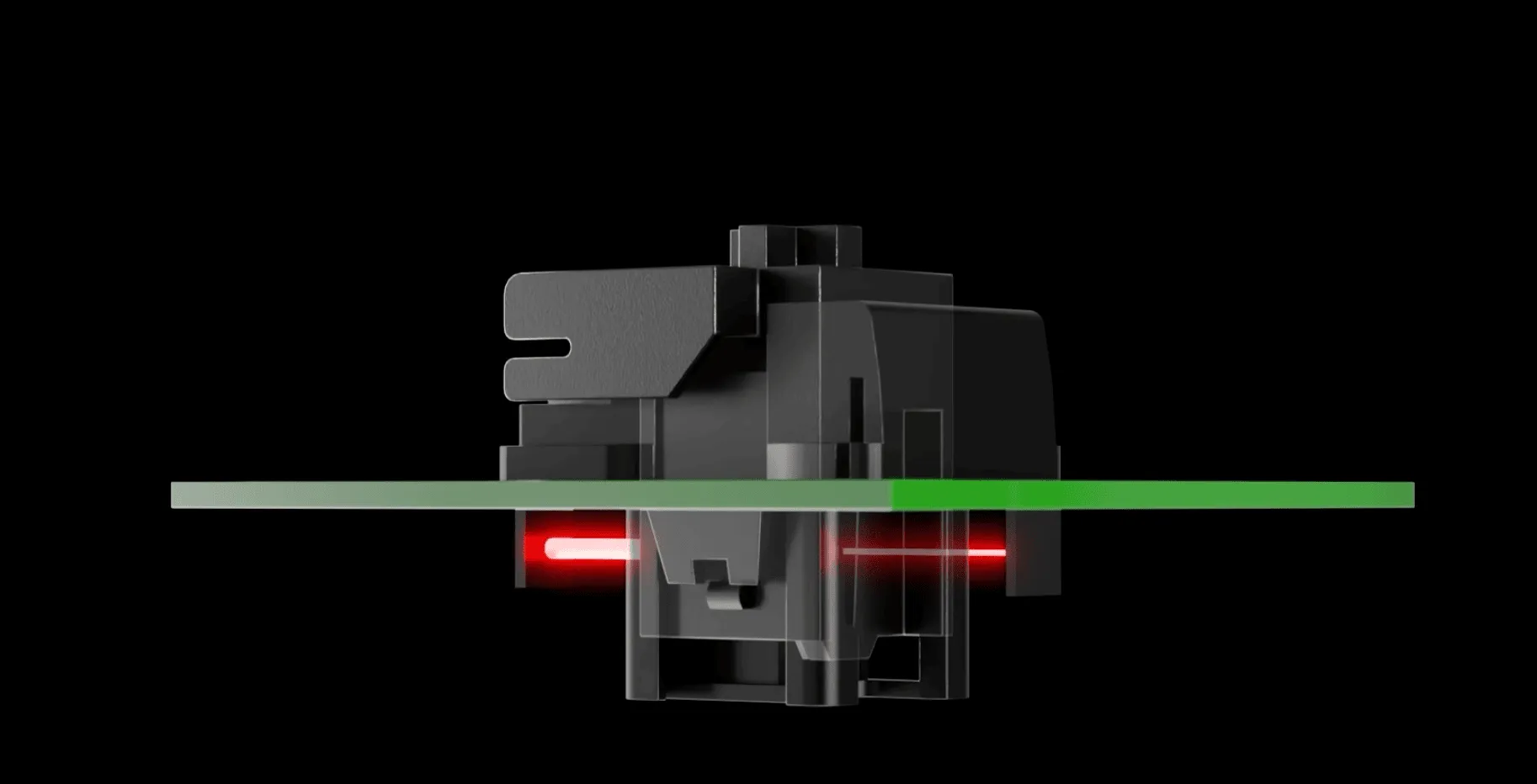
磁軸不靠金屬接點觸發,而是用霍爾效應感應磁場強度——這個差別開啟了「可程式化觸發行程」這個新世界。 Magnetic switches don't use metal contacts — they read magnetic field strength via Hall sensors. That difference unlocks a whole new world: programmable actuation.
金屬簧片接觸 → 觸發點固定(約 2mm)
Metal leaf contacts → fixed actuation (~2mm)
磁鐵 + 感應器 → 0.1mm 解析度,行程任意設定
Magnet + sensor → 0.1mm resolution, configurable travel
放開後立刻釋放、再按下立刻觸發——FPS 遊戲快速 A/D 走位的關鍵。
Releases the moment you lift, fires the moment you press — the key to A/D strafing in FPS.
辦公打字設 1.8mm 防誤觸;遊戲設 0.2mm 反應最快。
Set 1.8mm for typing to avoid misclicks; set 0.2mm for fastest gaming response.
同時按 A 和 D 時,最後按下的會壓制前一個——像 Wooting 的 Snappy Tappy。(部分遊戲已禁用)
When A and D are held together, the latest press wins — Wooting's "Snappy Tappy". (Banned in some games.)
按壓深度可當搖桿用——賽車遊戲油門可細控。
Press depth acts like a joystick axis — fine-tune throttle in racing games.
⚠️ 注意:磁軸的金屬零件較多容易吸鐵屑,且少數電競賽事禁止 SOCD 功能,使用前先確認規則。 ⚠️ Note: magnetic switches attract metal dust, and some esports events ban SOCD features — check the rules first.
這支影片把機械鍵盤的世界講得很完整,有興趣的人可以再深入看看。 This video covers the mechanical keyboard world really well — worth a watch if you want to go deeper.